Featured

Intro Post

Week 1

The purpose of this blog is to reflect on my educational journey through this class in Instructional Learning Technology.

After working in the secondary music classroom for seven years, I am excited to make the career switch to instructional design. There’s something so satisfying about creating and teaching that satisfies my inner musician.

While most people think of musicians as strictly performers, there was a surprising amount of time spent on learning how to educate (even if you weren’t studying music education). I think it’s expected for all musicians that at some point, you will be teaching. Music requires lifelong learning, whether you are beginning to learn an instrument or have been playing for twenty years. There’s always something new to discover. I find this philosophy fits with my personality and what I want out of life.

Learning and teaching is definitely something that brings me joy.

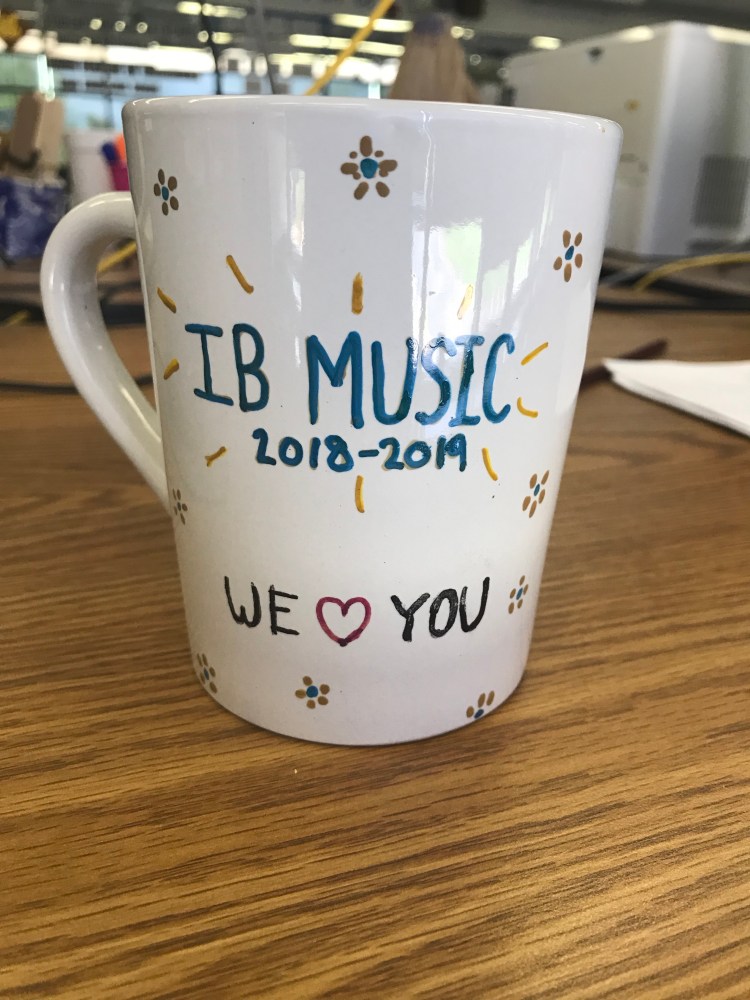
A goodbye present from my junior IB music class. One of the affirmations that makes me love education even more.

Week 6

In this final week of class, one of the last subjects we explored was personal learning networks (PLN). I feel like I had heard this term at some point in my career, but it must’ve never gotten explained or talked about. I really enjoy the idea of a PLN. Professional development doesn’t have to just be going to conferences or receiving training. It’s something you can do a little bit every day just by keeping up with certain groups or peers online. Exploring Twitter was also something I had never done before. I’ve never really known what to do with Twitter as social media, but I can definitely see a use for it professionally. That is something I will definitely be spending time on as this class ends. I want to feel connected to my profession, and this is a good way to do it.

Working on the final project took me back to the good old days of my masters degree. I had forgotten how interesting reading studies could be, especially about a subject I am interested in. I was excited to use Google Scholar, as I hadn’t heard of it before. Reading between the lines of the studies also took me back. Remembering how important it is to evaluate a study, to really look at how the research had been set up (sample size, was there a control group, over how much time, etc), gave my brain a good workout. I always feel like a better human when I remember to think critically about my sources. And it was very interesting reading about mobile learning. The subject turned out to be not exactly what I thought. As silly as it might be, I had assumed mobile learning was only using your smartphone but in more of an eLearning sense. The small, segmented approach to mobile learning and thinking of it as a broad tool really struck me. So much creativity is needed when it comes to mobile learning! There are so many tools out there and the only limit is if you can find the appropriate app or experience to go along with the lesson you want to teach.

I’ve been keeping a list of the different apps and websites that have been mentioned throughout the weeks that I want to take more time to explore. There really is just so much out there, and we were exposed to so many things over six weeks. As I said too, I will definitely be exploring PLNs through Twitter, and I’m also intrigued by Diigo. I will be keeping an open, critical mind when it comes to educational technology. After the week we spend on global communication, I will also be viewing the internet as a much more open, collaborative place…as long as you know where to look! I love the idea of Skype for Education and would have loved to use it in my classroom, if I had only known it existed. I feel very strongly that educational technology is something I am interested in, and feel affirmed that it is a part of the career that I want.

Week 5

Watching the video from MSU about how to spot fake news, it reminded me of the show The Good Place. Hopefully this doesn’t spoil the show for anyone (though I haven’t watched the last season, so no spoilers for me!!), but there comes a moment when our protagonists discover why everyone is sent to the Bad Place. It’s because our decisions have become so entangled with how complicated the world is. Unless you research every little aspect of the decisions you make, essentially every decision has bad ramifications somewhere down the line: the company that makes the product you buy has unethical business practices, the food you can afford is processed and unhealthy, etc.

While these problems aren’t exactly the same, the idea behind them is. If you don’t do your research or exercise due diligence when reading on the internet, you may be making a bad decision unwittingly. The amount of information out there is staggering. ANYONE can post ANYTHING from the safety behind their screens. I think learning these skills of fact-checking and source-checking are new 21st century skills that need to be taught. But the problem is that everyone needs to be taught these skills, not just young students. I grew up at the same time the internet was booming into people’s homes for the first time. Legitimacy was never something that we talked about. The first time I was even confronted with the idea was in college and the universal mantra of “Don’t Use Wikipedia!!!”. We have a chance now to change the mindset of the internet as a safe, true place, if we only take the opportunity to educate people.

For my final project I’ve chosen to look a little deeper into Mobile Learning. Using smartphones and tablets has become more prevalent in the classroom, and I am curious to see what trends and perspectives there are. I came from a 1:1 iPad school, so I definitely have my own thoughts about the perks and shortcomings of mobile learning.

I found Chapter 9 of the textbook interesting. I always have a bit of trouble really digesting theories and models. We all get to a point where we react instinctively to certain situations, automatically adjusting how we communicate. It’s interesting to see explanations of different types of communication. I think that overall, I gravitate towards constructivist ideas.

Week 4

This week we were exploring assistive technology and universal design for learning.

I really enjoyed the UDL principles. I feel like that is something I would want a poster of to keep in my workspace. The principles resonated with me as something that I unconsciously strove for in my teaching, but now I can give a voice to it and name what I was trying to do. Multiple means of representation, engagement, and action/expression…on the surface it sounds like differentiated instruction, but I am interested in doing more research to see if they are similar ideas or not.

I’m also curious to see how these principles play into adult learning. I don’t know much about adult learners besides their motivation to learn comes from a very different place than young learners, but I feel like using these principles will be useful. And if anything, the UDL principles spark creativity in my mind when I’m thinking about how I could potentially formulate a lesson or activity. That has to count for something useful, right??

Assistive technology is something that I had no prior knowledge about. It was never part of my personal or professional reality. I was at a private school where special education wasn’t at play in our classrooms. Overwhelmingly, the most common IEPs I saw were for students who needed longer when taking tests. But besides that, there was no conversation about how to help that student. We had no specialized position to deal with AT or accommodations, it was guidance counselors doing their best. I am sure that many of our students would have benefited from AT, however. I really related to the discussion of teamwork and communication in the IRIS module. I would’ve appreciated having group meetings about students who needed accommodations, so we all could’ve been on the same page. I’m sure it would’ve given me more guidance as to how to actually help that student, to learn what was actually in my power and responsibility to do. And in turn it would’ve given the student a better experience because we all would’ve been more supported and knowledgeable about the situation.

I think what I’m taking away from this week is that this is a whole, rich field unto itself. And it needs to be paid attention to, and incorporated more smoothly into our classrooms. Like anything, it’s work and difficult at first. But if you are supported and have a good team with you, it’s not impossible.

Week 3

This week we focused on Digital Citizenship. In this particular activity, we participated in some data mining. I chose to see what I could find on myself. Thankfully, it wasn’t a lot!

Overall, I think I have my digital presence on lockdown. I was very proud that my Facebook or Twitter did not pop up at all during my searches, nor did any pictures of myself anywhere except LinkedIn where I had a profile pic. It’s nice to know that my privacy settings are working properly!

The only shocks I had were with PeopleFinders, TruthFinder, and Radaris. My correct age, cities I had lived in, and family members populated quite easily, especially if you knew what states I had lived in. Radaris even had an old address and phone number available, free and right there for anyone to find.

I think my results would differ greatly than that of some students if they were data mining themselves. I grew up right alongside the internet’s evolution and therefore don’t trust it naturally. I value my privacy, and I know there are definitely things about my life I don’t want everyone to see. Putting it all on social media for everyone to see isn’t something I’ve grown up with. Just like we’ve been talking about being skeptical with technology as educators, I think it’s something students need to be directly taught as well. Because the internet is perhaps more intrinsic to their lives, they make assumptions about its nature and how safe they feel within it.

It’s an interesting dichotomy of private/public interaction. Because when you are doing anything on the internet, you are physically alone. Using a computer or smart phone is a physically solitary action. No one is watching what you’re doing, your parents aren’t telling you to “stop messing around” or “stay close”. You are unsupervised. You feel physically safe. BUT the interactions that you make online are completely public, even though you can’t see who is observing you. I don’t think that’s a concept that young minds grasp readily (probably some older minds too), at least not without being trained to think in that way. I’ve seen students suspended or expelled for cyber bullying or posting inappropriate pictures to Twitter. They think they’re alone, they feel like they’re alone. But we can see everything they do. And it can come back to haunt them, sometimes in unfair ways. It’s so important to realize that the internet leaves permanent footprints, and essentially anyone can find your footprints if they try and you haven’t protected yourself.

I enjoyed reading about learning theories in Chapter 8 of the Spector. Last fall, I had taken an online ID class that went more in-depth about learning theories. It’s some heavy stuff, but very fascinating to think about the mechanics behind learning. This was a good refresher.

Personally, I am a fan of behaviorism and humanism. My teaching style involved a lot of stimulus/response, mostly because I found it effective with my students but also gave great results when it came to learning musical concepts. It helped lay a foundation for essential skills, but it always got to a point where it wasn’t enough for a student to mimic an idea or concept back to you. Then you had to level up and talk about why something was the way it was, how it actually worked. But without that foundation, students weren’t ready for the why.

Humanism was definitely a theory that my school ascribed to as a whole. We wanted to create a safe learning environment, because that was when our students really blossomed. I always strove to create an atmosphere where students felt physically and mentally safe enough to take risks in the classroom. A lot of that came from how I ran my class, and how I treated my students. They were free to try out new ideas or ask questions without the risk of me getting angry or criticizing harshly. Some students were harder to reach than others, and had a harder time letting go of anxiety. But as long as I wasn’t going to be adding to that anxiety by being unfair or putting them on the spot when they weren’t ready, I knew I could reach them eventually and get them motivated to learn.
Week 2

This week we explored global projects. I decided to compare Skype for Education and Empatico.

At first glance, both projects are very similar. The main function of both platforms is to connect students across the globe through activities and collaboration. They share goals of creating empathy and developing communication skills, as well as exploring critical thinking and inquisitiveness through the activities.

Skype for Education has a broader variety of activities and connections than Empatico. Skype connects classrooms with activities and collaborative projects, and offers virtual field trips and access to experts as guest speakers. Classes can connect through a singular experience by Mystery Skyping or arranging to complete an activity together. Different collaborative projects can also be set up or joined, connecting with multiple classes across the globe. Most of the activities and connections offered seem to be short term, something completed in one class session or a few. Resources and activities are available for a wide range of age groups.

Empatico is a more focused and structured. It is designed only for teachers with students ages 6-11. It also requires more long-term relationships, with two classes becoming partners and teachers working as a team. Each activity is more structured with three stages to the activity (prepare, interact, and reflect), which makes sense as it is targeted at younger students who need more direction and guidance. Empatico seems to offer more opportunities for relationship-building, as activities are always done with the same group.

Both global projects are great ways for students to be inquisitive and become exposed to new points of view. Skype has a wider range of opportunities. It seems to require more planning from the teacher, though there is freedom to pick and choose activities and types of interactions. Skype seems to be more about discovery and experiencing new ideas firsthand. Empatico’s narrower focus on relationship-building is indicative of its mission to create empathy in younger students. Though there’s no reason why an Empatico teacher couldn’t supplement with a Skype for Education activity or field trip. The emphasis on linking Empatico activities to standards and research is very helpful to give teachers a reason to incorporate the platform into their lessons. Both projects overall share the same goals and offer many additional resources to educators to help use the tool properly (blogs, premade activities, easy ways to connect).

Seeing different ways that Skype could be used in the Ditch That Textbook video was inspiring. Hearing about the teachers’ direct experience with Mystery Skype was interesting, and definitely informed my impression about the amount of work necessary to use Skype properly in the classroom. You have to prepare your students with how to think, the technology itself won’t automatically make the activity successful or worthwhile. I also had to laugh when one of the teachers shared their experience using Mystery Skype with older students. It just goes to show you that any age of student will get excited about learning in unique ways outside the classroom lecture/read/note-taking norms. There were such a wide range of ways that each teacher used Skype. You are only limited by your own creativity and imagination (and time, of course).

Design a site like this with WordPress.com
Get started